

简单来说,这代码就干一件事:做个密码验证页面。用户输入密码对了就跳转到正文,错了就提示重试。二维码放那儿是引导关注公众号拿密码的,相当于把流量导到公众号去。
技术上就是最基础的HTML+CSS+JS,没用什么框架,加载快,手机电脑都能正常显示。
说白了就是个带门槛的门帘,想看内容?先关注公众号拿钥匙。
代码中的公众号二维码图片引用了网页同目录下的 gongzhonghao.png 图片,密码在代码底部区域可以自由修改。
<!DOCTYPE html>
<html lang="zh-CN">
<head>
    <meta charset="UTF-8">
    <meta name="viewport" content="width=device-width, initial-scale=1.0">
    <title>访问验证</title>
    <style>
        body { font-family: sans-serif; display: flex; justify-content: center; align-items: center; height: 100vh; margin: 0; background: #f4f6f8; }
        .card { background: #fff; padding: 30px; border-radius: 12px; box-shadow: 0 5px 20px rgba(0,0,0,0.1); text-align: center; width: 340px; }

        /* 提示文字样式 */
        .tip { color: #555; font-size: 14px; line-height: 1.5; margin-bottom: 15px; }

        img { width: 130px; height: 130px; margin: 0 auto 20px; border: 1px solid #eee; border-radius: 8px; display: block; }

        input { width: 100%; padding: 12px; margin-bottom: 15px; border: 1px solid #ddd; border-radius: 6px; box-sizing: border-box; outline: none; font-size: 15px; }
        input:focus { border-color: #07c160; }

        button { width: 100%; padding: 12px; background: #07c160; color: #fff; border: none; border-radius: 6px; cursor: pointer; font-size: 16px; font-weight: bold; }

        .error { color: #ff4d4f; font-size: 13px; min-height: 20px; margin-top: 12px; }

        /* --- 新增:悬浮提示框样式 --- */
        #f12-toast {
            position: fixed;
            top: 20px;
            left: 50%;
            transform: translateX(-50%);
            background-color: rgba(0, 0, 0, 0.8);
            color: #fff;
            padding: 10px 20px;
            border-radius: 6px;
            font-size: 14px;
            opacity: 0;
            transition: opacity 0.3s ease;
            visibility: hidden;
            z-index: 9999;
        }
        /* 当添加 'show' 类时,提示框变为可见 */
        #f12-toast.show {
            opacity: 1;
            visibility: visible;
        }

        /* 手机端适配 */
        @media (max-width: 480px) {
            .card { width: 80%; padding: 25px 20px; }
            h3 { font-size: 18px; margin-top: 0; }
            .tip { font-size: 13px; }
            img { width: 110px; height: 110px; }
        }
    </style>
</head>
<body>

<!-- 新增:悬浮提示框HTML元素 -->
<div id="f12-toast">禁止打开F12哦~</div>

<div class="card">
    <h3>安全访问验证</h3>

    <!-- 新增的提示内容 -->
    <p class="tip">关注公众号<br>获取访问密码</p>

    <!-- 你的二维码图片 -->
    <img src="gongzhonghao.png" alt="二维码">

    <input type="text" id="pwd" placeholder="请输入密码" onkeydown="if(event.key==='Enter')check()">
    <button onclick="check()">立即解锁</button>
    <div class="error" id="err"></div>
</div>

<script>
    // ⚠️ 在这里设置密码
    const PWD = "8888";

    function check() {
        const val = document.getElementById('pwd').value.trim();
        const err = document.getElementById('err');

        if (val === PWD) {
            window.location.href = "content.html"; // 跳转地址
        } else {
            err.innerText = "密码错误,请重试";
            // 简单的震动效果
            document.querySelector('.card').animate([
                { transform: 'translateX(0)' }, { transform: 'translateX(-5px)' },
                { transform: 'translateX(5px)' }, { transform: 'translateX(0)' }
            ], { duration: 300 });
        }
    }

    // --- F12 拦截逻辑已更新 ---
    document.addEventListener('keydown', e => {
        if (e.key === 'F12') {
            e.preventDefault(); // 阻止F12的默认行为(打开开发者工具)

            const toast = document.getElementById('f12-toast');
            // 每次按下都先移除再添加'show'类,可以重置CSS动画
            toast.classList.remove('show');
            // 强制浏览器重绘,确保动画能重新触发
            void toast.offsetWidth;
            toast.classList.add('show');

            // 1.5秒后自动隐藏提示框
            setTimeout(() => {
                toast.classList.remove('show');
            }, 1500);
        }
    });
</script>

</body>
</html>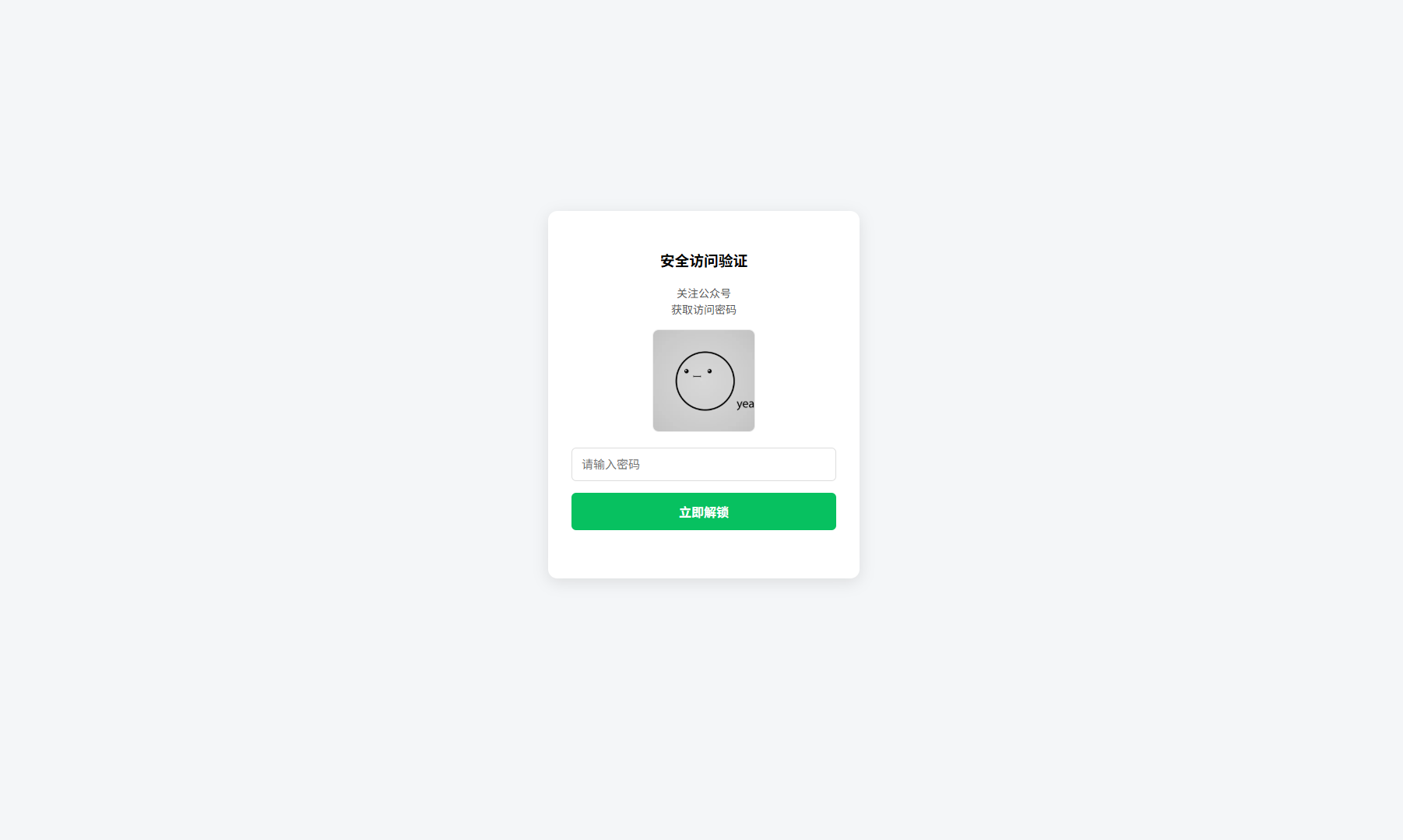
评论 (0)