


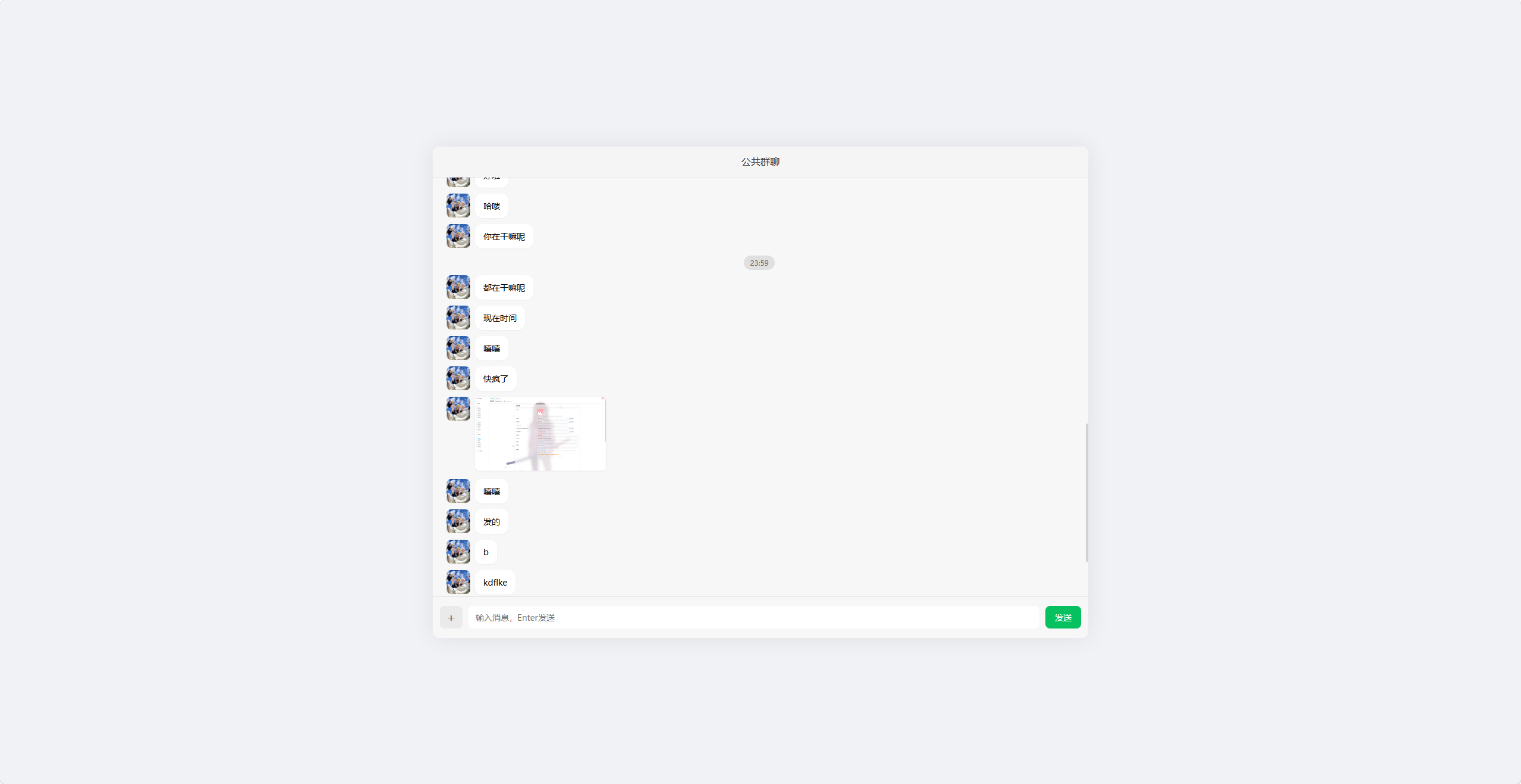
这是一个仿微信在线群聊网页,单文件实现,支持自动匹配头像,理论上是匿名聊天的
演示图片:
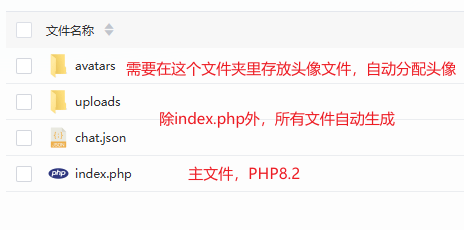
说明图片:
完整文件代码:
<?php
session_start();
header('Content-Type: text/html; charset=utf-8');
date_default_timezone_set('Asia/Shanghai');

const AVATAR_DIR = 'avatars/';
const UPLOAD_DIR = 'uploads/';
const CHAT_FILE = 'chat.json';

// 自动创建目录
is_dir(AVATAR_DIR) || mkdir(AVATAR_DIR, 0755, true);
is_dir(UPLOAD_DIR) || mkdir(UPLOAD_DIR, 0755, true);

// 初始化聊天文件
if (!file_exists(CHAT_FILE)) {
    file_put_contents(CHAT_FILE, json_encode([], JSON_UNESCAPED_UNICODE));
}

// 生成用户信息
if (!isset($_SESSION['user'])) {
    $avatarList = glob(AVATAR_DIR . '*.{jpg,png,jpeg}', GLOB_BRACE) ?: [];
    $_SESSION['user'] = [
        'id'     => uniqid(),
        'avatar' => !empty($avatarList) ? $avatarList[array_rand($avatarList)] : 'https://picsum.photos/40'
    ];
}
$user = $_SESSION['user'];

// 获取消息接口
if (isset($_GET['get_msg'])) {
    echo file_get_contents(CHAT_FILE) ?: '[]';
    exit;
}

// 发送消息&上传
if ($_SERVER['REQUEST_METHOD'] === 'POST') {
    $msg = [
        'uid'      => $user['id'],
        'avatar'   => $user['avatar'],
        'time'     => time(),
        'time_str' => date('H:i'),
        'content'  => trim($_POST['content'] ?? ''),
        'type'     => 'text',
        'url'      => '',
        'name'     => ''
    ];

    if (!empty($_FILES['file']['tmp_name']) && $_FILES['file']['error'] === UPLOAD_ERR_OK) {
        $file = $_FILES['file'];
        $ext = strtolower(pathinfo($file['name'], PATHINFO_EXTENSION));
        $filename = uniqid() . '.' . $ext;
        $savePath = UPLOAD_DIR . $filename;

        move_uploaded_file($file['tmp_name'], $savePath);
        $msg['url']  = $savePath;
        $msg['name'] = $file['name'];

        $msg['type'] = match(true) {
            in_array($ext, ['jpg','jpeg','png','gif','webp']) => 'image',
            in_array($ext, ['mp4','mov']) => 'video',
            default => 'file'
        };
    }

    $chat = json_decode(file_get_contents(CHAT_FILE), true) ?? [];
    $chat[] = $msg;
    file_put_contents(CHAT_FILE, json_encode($chat, JSON_UNESCAPED_UNICODE));
    exit;
}
?>
<!DOCTYPE html>
<html lang="zh-CN">
<head>
<meta charset="UTF-8">
<meta name="viewport" content="width=device-width, initial-scale=1.0, user-scalable=no, viewport-fit=cover">
<title>全适配群聊</title>
<style>
    *{margin:0;padding:0;box-sizing:border-box;font-family:"Microsoft YaHei",sans-serif}
    /* 全局居中容器:电脑端居中,手机端全屏 */
    body{
        min-height:100vh;
        background:#f0f2f5;
        padding:4px;
        display:flex;
        align-items:center;
        justify-content:center;
        overflow:hidden;
    }

    /* ==================== 主容器:电脑端+手机端双适配 ==================== */
    .container{
        width:100%;
        height:100%;
        max-width:1100px;
        max-height:825px;
        aspect-ratio:4/3;
        background:#fff;
        border-radius:12px;
        box-shadow:0 0 35px rgba(0,0,0,0.08);
        overflow:hidden;
        display:flex;
        flex-direction:column;
        margin:0 auto;
    }
    /* 手机端:取消固定比例,全屏适配+安全区 */
    @media (max-width:768px){
        .container{
            max-width:100%;
            max-height:calc(100vh - 8px);
            aspect-ratio:auto;
            border-radius:8px;
            padding-bottom:env(safe-area-inset-bottom);
        }
    }

    /* ==================== 顶部栏:flex居中,彻底解决文字错位 ==================== */
    .header{
        height:52px;
        background:#f5f5f5;
        border-bottom:1px solid #e6e6e6;
        display:flex;
        align-items:center;
        justify-content:center;
        flex-shrink:0;
        padding-top:env(safe-area-inset-top);
    }
    .header h1{
        font-size:16px;
        font-weight:500;
        color:#333;
        line-height:1;
        margin:0;
        padding:0;
    }

    /* ==================== 聊天区域:优化滚动,无漂移 ==================== */
    .chat-box{
        flex:1;
        padding:15px;
        overflow-y:auto;
        background:#f7f7f7;
        -webkit-overflow-scrolling:touch;
        overflow-anchor:none;
        scroll-behavior:smooth;
    }
    .chat-box::-webkit-scrollbar{width:4px}
    .chat-box::-webkit-scrollbar-thumb{background:#d1d1d1;border-radius:2px}

    /* 时间样式 */
    .time-box{text-align:center;margin:12px 0}
    .time-box span{
        background:#e0e0e0;color:#666;
        padding:4px 10px;border-radius:12px;font-size:12px
    }

    /* 消息布局 */
    .msg{display:flex;margin:10px 0;align-items:flex-start}
    .me{flex-direction:row-reverse}
    .avatar{
        width:40px;height:40px;
        border-radius:8px;overflow:hidden;
        flex-shrink:0;margin:0 8px;
    }
    .avatar img{width:100%;height:100%;object-fit:cover}
    .msg-content{max-width:75%}

    /* 文本气泡 */
    .text{
        padding:10px 14px;
        border-radius:12px;
        background:#fff;
        font-size:14px;line-height:1.5;
        box-shadow:0 1px 2px rgba(0,0,0,0.04);
        display:inline-block;
    }
    .me .text{background:#07c160;color:#fff}

    /* ==================== 图片直接显示:不使用卡片 ==================== */
    .msg-img{
        max-width:220px;
        max-height:300px;
        border-radius:8px;
        box-shadow:0 1px 3px rgba(0,0,0,0.05);
        cursor:pointer;
        object-fit:contain;
    }
    /* 小屏手机图片自适应 */
    @media (max-width:400px){
        .msg-img{max-width:180px;max-height:220px}
    }

    /* ==================== 统一卡片样式:视频和文件保持统一 ==================== */
    .uni-card{
        width:220px;
        min-height:125px;
        background:#fff;
        border-radius:12px;
        padding:10px;
        box-shadow:0 1px 3px rgba(0,0,0,0.05);
        cursor:pointer;
        display:flex;
        flex-direction:column;
        align-items:center;
        justify-content:center;
        gap:8px;
        overflow:hidden;
    }
    .uni-card-video-inner{
        width:100%;
        aspect-ratio:16/9;
        display:flex;
        align-items:center;
        justify-content:center;
    }
    .card-icon{width:26px;height:26px;flex-shrink:0}
    .card-name{
        font-size:13px;color:#333;
        max-width:90%;
        white-space:nowrap;
        overflow:hidden;
        text-overflow:ellipsis;
        text-align:center;
    }
    /* 小屏手机卡片自适应缩小 */
    @media (max-width:400px){
        .uni-card{width:180px;min-height:100px}
    }

    /* ==================== 底部栏:弹性布局,无错位 ==================== */
    .footer{
        height:70px;
        background:#f7f7f7;
        border-top:1px solid #e6e6e6;
        display:flex;
        align-items:center;
        padding:8px 12px;
        gap:10px;
        flex-shrink:0;
    }
    #file{display:none}
    .upload-btn{
        width:38px;
        height:38px;
        min-width:38px;
        background:#eaeaea;
        border-radius:8px;
        display:grid;place-items:center;
        cursor:pointer;font-size:20px;color:#666;
        flex-shrink:0;
    }
    .input{
        flex:1;
        height:38px;
        min-width:100px;
        border:none;border-radius:8px;
        padding:0 12px;outline:none;
        font-size:14px;background:#fff;
    }
    .send-btn{
        width:60px;
        height:38px;
        min-width:60px;
        background:#07c160;color:#fff;
        border:none;border-radius:8px;
        cursor:pointer;font-size:14px;
        flex-shrink:0;
    }

    /* 预览弹窗 */
    .preview{
        position:fixed;inset:0;
        background:rgba(0,0,0,0.85);
        display:none;align-items:center;justify-content:center;
        z-index:999;
    }
    .preview img,.preview video{
        max-width:85%;max-height:85%;
        border-radius:8px;object-fit:contain;
    }
</style>
</head>
<body>
<div class="container">
    <div class="header"><h1>公共群聊</h1></div>
    <div class="chat-box" id="chatBox"></div>
    <div class="footer">
        <label for="file" class="upload-btn">+</label>
        <input type="file" id="file" accept="image/*,video/*,.zip,.pdf,.doc,.docx">
        <input type="text" id="content" class="input" placeholder="输入消息,Enter发送">
        <button class="send-btn" onclick="send()">发送</button>
    </div>

    <div class="preview" id="preview">
        <img id="prevImg" style="display:none">
        <video id="prevVid" controls style="display:none"></video>
    </div>
</div>

<script>
    const chatBox = document.getElementById('chatBox');
    const content = document.getElementById('content');
    const fileInput = document.getElementById('file');
    const preview = document.getElementById('preview');
    const prevImg = document.getElementById('prevImg');
    const prevVid = document.getElementById('prevVid');

    let autoScroll = true;
    let lastShowTime = 0;
    const TIME_INTERVAL = 300;

    // 优化滚动判断,避免漂移
    chatBox.addEventListener('scroll', () => {
        const bottomDistance = chatBox.scrollHeight - chatBox.scrollTop - chatBox.clientHeight;
        autoScroll = bottomDistance <= 30;
    });

    // 渲染消息
    function renderMsg(list) {
        let html = '';
        lastShowTime = 0;
        list.forEach(item => {
            if (item.time - lastShowTime > TIME_INTERVAL || lastShowTime === 0) {
                html += `<div class="time-box"><span>${item.time_str}</span></div>`;
                lastShowTime = item.time;
            }

            const isMe = item.uid === '<?= $user['id'] ?>';
            html += `
            <div class="msg ${isMe ? 'me' : ''}">
                <div class="avatar"><img src="${item.avatar}"></div>
                <div class="msg-content">
                    ${item.type === 'text' ? `<div class="text">${item.content}</div>` : ''}

                    <!-- 图片直接显示:不使用卡片 -->
                    ${item.type === 'image' ?
                        `<img src="${item.url}" class="msg-img" onclick="view('${item.url}','img')" title="${item.name}">` : ''}

                    <!-- 视频保持统一卡片 -->
                    ${item.type === 'video' ?
                        `<div class="uni-card" onclick="view('${item.url}','vid')">
                            <div class="uni-card-video-inner">
                                <svg class="card-icon" viewBox="0 0 24 24" fill="none" stroke="#07C160" stroke-width="2">
                                    <path d="M5 3l14 9-14 9V3z"></path>
                                </svg>
                            </div>
                            <div class="card-name" title="${item.name}">${item.name}</div>
                         </div>` : ''}

                    <!-- 文件保持统一卡片 -->
                    ${item.type === 'file' ?
                        `<div class="uni-card" onclick="window.open('${item.url}','_blank')">
                            <svg class="card-icon" viewBox="0 0 24 24" fill="none" stroke="#07C160" stroke-width="2">
                                <path d="M14 2H6a2 2 0 0 0-2 2v16a2 2 0 0 0 2 2h12a2 2 0 0 0 2-2V8z"></path>
                                <polyline points="14 2 14 8 20 8"></polyline>
                                <line x1="16" y1="13" x2="8" y2="13"></line>
                                <line x1="16" y1="17" x2="8" y2="17"></line>
                            </svg>
                            <div class="card-name" title="${item.name}">${item.name}</div>
                         </div>` : ''}
                </div>
            </div>`;
        });
        chatBox.innerHTML = html;
        // 优化自动滚动,无卡顿
        autoScroll && setTimeout(()=>{chatBox.scrollTop = chatBox.scrollHeight;},0);
    }

    // 实时拉取消息
    async function getMsg() {
        try {
            const res = await fetch('?get_msg=1');
            const list = await res.json();
            renderMsg(list);
        } catch (e) {}
    }
    getMsg();
    setInterval(getMsg, 1000);

    // 发送消息
    function send() {
        const t = content.value.trim();
        if (!t) return;
        const fd = new FormData();
        fd.append('content', t);
        fetch('', { method: 'POST', body: fd });
        content.value = '';
        content.focus();
    }

    // 回车发送
    content.addEventListener('keydown', e => e.key === 'Enter' && send());

    // 文件上传
    fileInput.onchange = function () {
        if (!this.files.length) return;
        const fd = new FormData();
        fd.append('file', this.files[0]);
        fetch('', { method: 'POST', body: fd });
        this.value = '';
        content.focus();
    }

    // 媒体预览
    function view(url, type) {
        preview.style.display = 'flex';
        type === 'img' ? (prevImg.src=url,prevImg.style.display='block',prevVid.style.display='none')
                       : (prevVid.src=url,prevVid.style.display='block',prevImg.style.display='none');
    }

    // 关闭预览
    preview.onclick = (e) => {
        if(e.target === preview){
            preview.style.display = 'none';
            prevVid.pause();
            content.focus();
        }
    };
</script>
</body>
</html>
评论 (0)